 |
 Club Registration Text Blocks now allow Images Club Registration Text Blocks now allow Images |
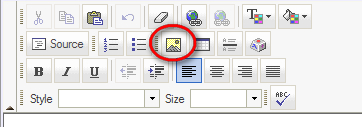
In the Club Registration system, the Text Block element now allow clubs to insert their own images. This functionality allows clubs to upload their own header or icon images and insert them into any Text block element for use in any registration. This will help clubs further customize and brand registrations and allow for more creative use of the Text Block element type. Each club has their own image folder and the upload and image browsing system keeps all of your club's images in a central location for re-use in multiple registrations. In order to insert an image into a Text Block, start by clicking the Image button on your editor toolbar as seen below.
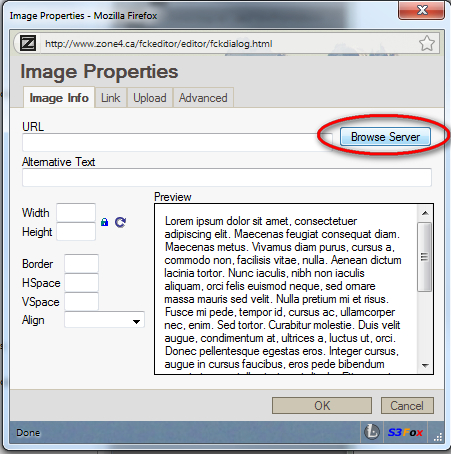
Then at the following screen, click the "Browse Server" button.
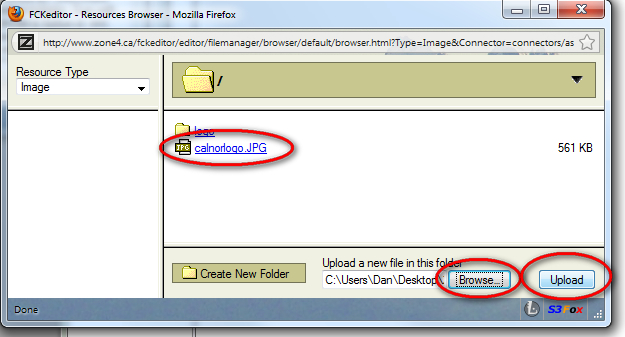
Then on the following scrnee, click "Browse" to pick the image on your local hard drive, and then click Upload to upload it to your club's folder. After it is uploaded, you will see it listed there in the list above. Click on it to return to the previous screen where clicking OK will insert the image int your text block.
|
Copyright 2026 - Zone4 Systems zone4.ca Privacy Policy Delivery/Refund Policy Terms of Service Contact Zone4