 |
 New Remittance Fields and Club Registration Upgrades New Remittance Fields and Club Registration Upgrades |
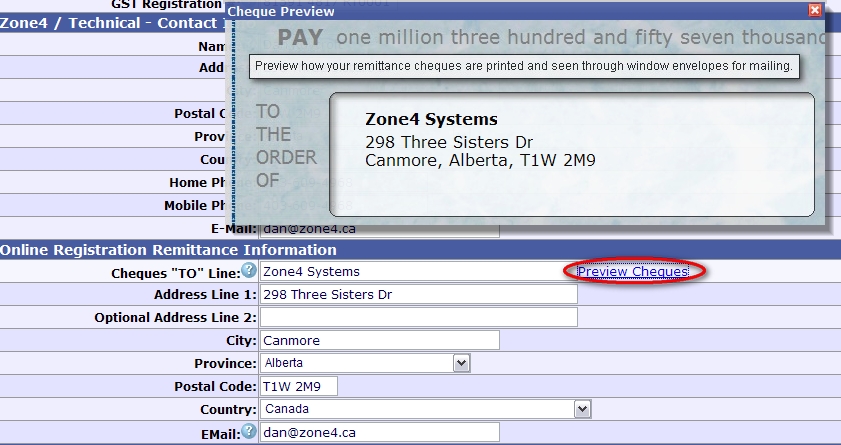
Zone4 has introduced a series of upgrades to further streamline remittances as well as to clarify the typical progression of club registration building, testing, and going live. Computer Printed Cheques and Additional Remittance Address Fields In order to increase efficiency and accuracy at Zone4, we are moving to computer printed remittance cheques. This means that all club and race registration remittances will be printed directly onto cheques instead of hand-written. This change along with other feedback necessitated the addition of a third set of address fields on your Club Settings->Contact / Address Info area. You will now see a full set of address information specifically for remittances. This is useful if you want remittance cheques going to a third person such as a club treasurer instead of either the Club Address or Technical Contact address as limited to before. These fields allow you to specify exactly how you want the cheques to be printed keeping in mind that the cheques not only need to have the proper "TO" text specified (such as the club name) but also the address that will be viewed through the window envelopes for mailing. Click the Preview Cheques link pops up a visual preview of how the cheques will be printed.
The new Remittance fields also include an EMail field so you can specify which club e-mail addresses will get copies of the remittance statements. This clarifies the concept as it wasn't very clear before who would be included on those e-mail statements. You can enter multiple e-mail addresses separated by a space. The new remittance fields have been pre-populated with the information from either the Club or Contact address fields according to each club's "Mail Remittance Cheques to" setting.
New TestMode/LiveMode Status and Approval System for Club Registrations The Club Registration "Visible / Live" field and "Open / Close" date fields have proven to be an awkward implementation that has resulted in confusion and misuse. The concept didn't really fit the true life cycle of a registration and this area needed improvement. Registrations should follow the following life-cycle: Build, Test, Revise, Live, Closed. The problem with the single "Live / Visible" setting is that:
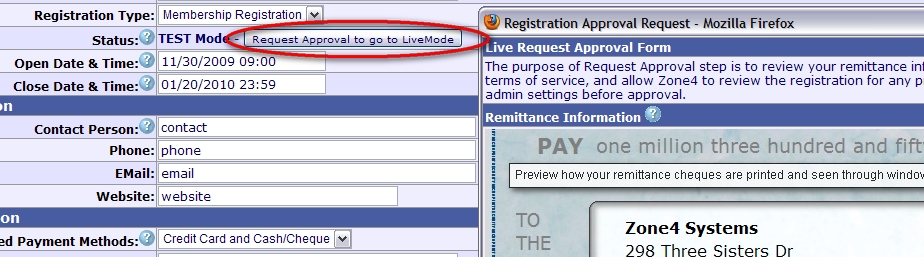
So now instead of the Live / Visible setting, clubs will only see a Status field which starts off in TestMode for Building, Testing, and Revision purposes. When a registration has been built and tested, the club can click the "Request Approval to go to LiveMode" button. This pops up the following dialog which serves several purposes. Firstly it allows you to review your club's remittance information and to see how your cheques will be printed. It also ensures that you have agreed to Zone4's Terms of Service document. And finally it provides a method for Zone4 to review your request before LiveMode approval is granted and to set certain admin settings that will be critical in version 2 coming in the future. Upon submitting your approval request, Zone4 is notified and will process your request as soon as possible. You will be e-mailed as to the status of your request. If changes are required or recommended, the e-mail will tell you what issues Zone4 has found and what needs to be changed. Once LiveMode has been approved, your registration is taken out of TestMode, removing all the TestMode transactions, and is now ready for the Live portion of it's operation. In LiveMode the Open and Close status of your registration is controlled solely by your Open and Close dates. So if the registration is in LiveMode but the current date is before your Open Date, the front end of the registration will say "The Registration isn't open yet. It is scheduled to open at: XYZ." And of course after your registration has closed, it will say "Closed" and not revert back to TestMode.
The new TestMode/LiveMode Status concepts are also seen clearly on the Club Registration access panels. This should provide a better visual indicator of what registration are currently open or opening soon.
This new implementation brings needed clarity to the above concepts and will help the transition to further upgrades in the future. |

Copyright 2026 - Zone4 Systems zone4.ca Privacy Policy Delivery/Refund Policy Terms of Service Contact Zone4