
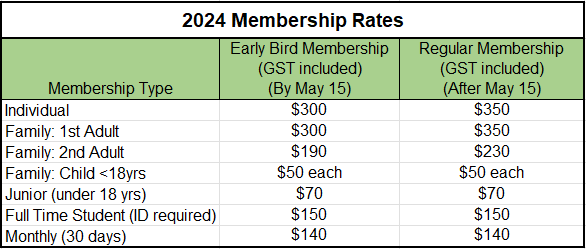
*Effective August 1 - Individual Adult and Family Adult rates are discounted to the following:
- Individual Adult: $200
- Family First Adult: $200
- Family 2nd Adult: $100
- Family Child < 18yrs: $25
- Junior < 18 yrs: $40
- Full Time Student ( ID Required ): $100
Tuxedo Tennis Club 2024 Registration
- Memberships are non-transferable and non-refundable.
- No refunds will be given in the event club operations are affected due to covid19.
- Payment is by Credit Card Only (VISA, Mastercard).
- Processing fees will be added on Checkout resulting in total Membership prices as shown above.
Individual Registration - 1 person per registration
- Includes Individual (Adult), Junior (under 18 years), Full time Student (ID required) or Monthly (30 days) Membership.
- Student memberships require proof of full time student study
Family Membership Registration
- All family members must live at the same address.
- Family membership must consist of 1 or 2 Adults and 0 to unlimited Children (Children must be < 18).
- Each member of the family must be entered (Repeat the 'Add Person' process to add each family member ).
- Each Family Adult is required to provide their own email address.
- Purchase the appropriate membership for each family member ( Family 1st Adult or Family 2nd Adult, or Family Child ). For example: A family with two parents and three children would enter 5 people, Family 1st Adult, Family 2nd Adult, and 3 Family Child).
Registration Steps:
Step 1:
- Select Membership Type.
- Enter Address.
- Click Continue. This will take you to page 2.
Step 2:
If purchasing an Individual Membership,
- Click the 'Add First Person' button.
- Enter Name and contact information
- Select the Membership Type being purchased ( Individual, Junior, Student or Monthly )
- Complete the Waiver
- Select Checkout to pay and complete registration.
If purchasing a Family Membership - Repeat the following for each Family member,
- Click the 'Add First Person' button.
- Enter the Name and Contact information for the first family member.
- Select the membership being purchased ( Family 1st Adult or Family 2nd Adult or Family Child )
- Complete the Waiver and remaining information on the form.
- Select Continue. A new page will display showing the information entered. Scroll down to find the 'Add Person' button and Repeat ' Add Person' for the next Family Member. Previously entered data can also be edited and corrected using the Edit option.
- Once all family members are entered, Select Checkout to pay and complete registration.
Complete all required fields - Required fields are marked with a red asterisk [*]
- Tuxedo Tennis Club
- Winnipeg, MB