Zone4 has released a series of minor upgrades to the Club Registrations system around the concepts of Registration form creation and sharing.
- Custom Reports Copied to New Registrations - In the past when you created a new registration based on an old registration or template, only the main registration settings and elements were copied across into the new form. Many clubs had requested that all of the custom reports that they had built in the previous form be carried forward as well. This has now been added and is performed automatically by the creation process. No registration data is stored in those custom reports so copying just the parameters such as selected fields, filters, grouping, etc allows the club to get up and running with new forms much quicker.
- Registration Template Sharing Between Clubs - A number of clubs collaborate on registrations and there was needed a method for one club to be able to make a copy of a registration form from another club's account. Zone4 has now added a simple Yes/No option in the main Registration Settings of each registration titled: "Share Setup with Other Clubs." as seen below.
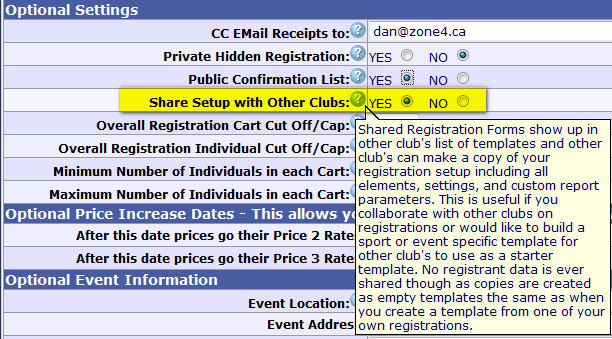
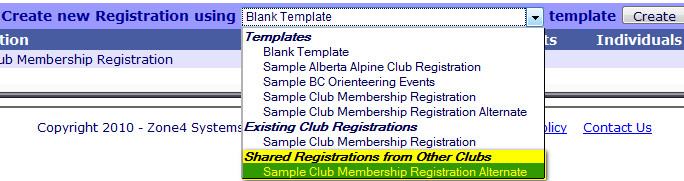
When you set this to Yes, all other Zone4 clubs will see your registration listed in a new section of their template list called "Shared Registrations from Other Clubs." Other clubs can then use your registration as a starter template to build their own registration based on the settings, elements, and custom reports you specified. This is useful if you collaborate with other clubs on registrations or would like to build a sport or event specific template for other club's to use as a starter template. No registrant data is ever shared though as copies are created as empty templates the same as when you create a template from one of your own registrations. You don't need to leave registrations as "Shared" indefinitely so if you only need to transfer a copy to a different club's account, you can just set the registration to "Shared", login to the other account, create the new registrations based on the shared template, then log back into the old account and set the registration sharing to No.
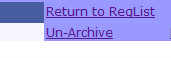
- Registration Archiving - now that the regitration system has been in use for a number of years some club's accounts are getting visually cluttered with dozens of registrations. There is now an "Archive" feature allowing you to move older un-needed registrations off your main registration list and into an "Archive" area. Just click the "Archive" link and confirmation on the right hand side of your registration list. To view archived registration, just click "View Archive" at the top of the column and you will be taken to a list of your older registrations as well as an "Un-Archive" link if needed. Your Template list also differenciates between Existing and Archived club registrations to help make management easier.


 Club Registration Minor Upgrades Released